
If you read my very first post, you’ll know I already solved my bus problem. I built a button in my house that changes my LED lights to green when the bus is close. It’s great. And in blog 6 I talked about how I updated it so that now it even shows on a little screen. I love it.
There’s just one obvious flaw: it only works in my house.
The Button’s Blind Spot
The moment I leave the house, I’m back to guessing. Walking to the bus stop from the tube station wondering if the 43 is two minutes away or twelve. Do I have time to pop into a shop and pick up some essentials or should I be running? Checking TfL, which takes four taps and shows me fourteen routes I don’t need before I find the one I do. Even using something like Citymapper, which I do love, still means having a route set up and I don’t really need a route for commuting every single day.
The information I wanted was always the same. Just: how many minutes? That’s it. Everything else is noise.
The Pocket Version
So I asked Gemini to build me a website. Not an app. Not a widget. A single page that does exactly one thing: tells me how many minutes until my next bus.
But here’s where I had a bit of fun with it. Instead of just slapping a number on the screen, I asked Gemini to visualise the countdown. The brief I gave it was this: a 16-bit pixel art bus that slides across the screen toward a cartoon bus stop. The further away the bus is in time, the further it sits from the stop. When it’s one minute away, the little pixel bus is almost pulling in.
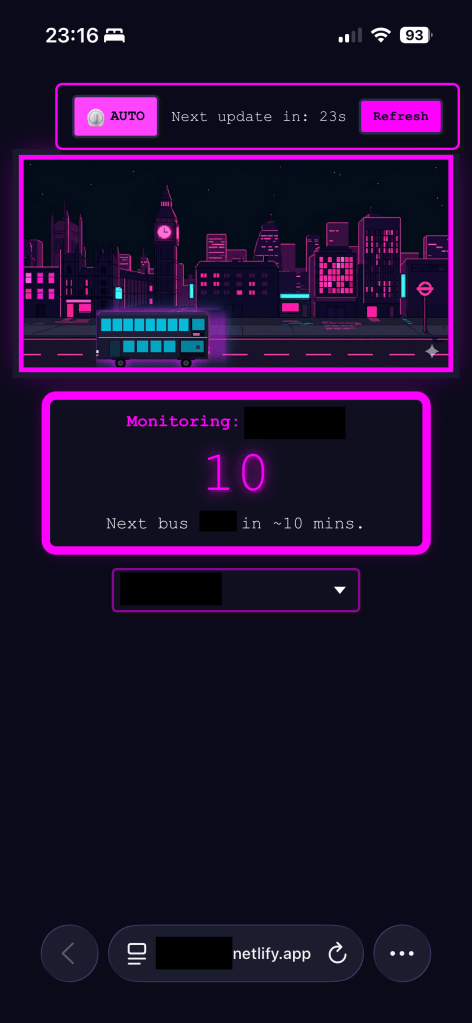
It is completely unnecessary. It is also brilliant.
The site does two things and nothing else:
- Shows the animated countdown to my next bus.
- Lets me toggle between my two main stops, the one right outside my house and the one near the tube.
That’s it. No route planning. No service alerts. No “Upgrade to Premium.” The second I open it, I have exactly what I came for. I’ve added it to my iPhone’s homescreen so it sits there looking like a proper app, and nobody needs to know it’s a webpage I built in an afternoon.
How I Built It and Host It for Free
This sounds more complicated than it is.
- Describe your idea to your agent of choice: I explained the concept in detail, the data source for the bus times, the two-stop toggle, and the 16-bit animation. Gemini wrote the HTML, CSS, and JavaScript. I tweaked a few things to get it exactly how I wanted.
- Push it to GitHub: The project lives in a GitHub repo. If you haven’t used Git before, there are great tutorials out there, and Gemini will happily walk you through the basics step by step.
- Connect to Netlify: Netlify is a free hosting service that links directly to your GitHub repo. Every time you push a change, it automatically deploys the updated version to your live site. No manual uploads, no server management, no faff. The great thing here is because you’re just using it for personal use, you’re never really going to hit the limits.
- Save it to your homescreen: On iPhone, open the site in Safari, tap Share, then “Add to Home Screen.” Android and Chrome have the same option. Done. It now lives on your phone like any other app.
The Bigger Idea
There are hundreds of apps for tracking public transport. None of them do exactly what I want. They all show too much, load too slowly, or want me to sign up for something. The older version of that frustration was “I wish there was an app for that.” The newer version is: you can just build it. In an afternoon. For free. Exactly the way your brain works, because you designed it.
I keep thinking about this a lot at the moment. The real power of AI isn’t the dramatic stuff, it’s not just the autonomous agents or the enterprise pipelines. It’s this. The ability for a normal person with a problem and an afternoon to build a specific, personal tool that does precisely what they need and nothing more.
You’re not beholden to the App Store. You’re not stuck waiting for a developer to add the feature you want. If you don’t like how something works, change it. Make your own version. And now you have something that fits exactly the way you want to use it. That, to me, is actually quite exciting. And wait until you see what I’m going to write about next week. I kind of took this, what I would say is probably way too far.
A Realistic Note
I won’t pretend this is as simple as asking ChatGPT a question. You’ll need to get slightly comfortable with a code editor and the basics of Git. It’s a small curve, but it really isn’t a steep one. Spend a couple of hours on YouTube, use Gemini as your tutor, and you’ll be surprised how quickly it clicks. Once the setup is done once, the next project takes a fraction of the time.
The Result
I now have a tiny 16-bit bus sliding across my phone screen every morning. It’s a bit ridiculous. It’s also told me to run on more than one occasion, which means I’ve caught buses I definitely would have missed otherwise.
Go build something stupidly useful. Or just stupid 🙂
 Fizzy Logic: My Messy AI Journey
Leave a comment