
I’ve stopped using a note-taking app. No Notion, no Evernote, no Apple Notes. Instead, I write everything in a code editor, saved as plain text or Markdown files.
I know that sounds a little inconvenient, and maybe even like something only an absolute nerd would do. But hear me out, because I think this is one of the most practical things anyone can start doing right now, and it means I don’t need to pay for another subscription to something. I’ve written about why Markdown is worth learning before, but this post is less about the format itself and more about the system and the thinking behind going all-in on it.
The Real Reason I Made the Switch
It wasn’t about the editor. It was about thinking ahead. In my deep reading post, I mentioned switching back to plain text as a way to force clearer thinking. That was true, but it was only part of the story.
At some point in the not-too-distant future, I’m going to want to upload all of my notes to one place and have an AI search through them, analyse them, and help me make sense of years of accumulated thinking. The problem is that if those notes are locked inside a proprietary app, or buried in a pile of old PowerPoint decks, getting them into that AI is going to be a project in itself.
By writing everything as plain text now, I’m not doing extra work. I’m actually doing less, because there’s no conversion step later. The notes are already in a format that any tool, AI or otherwise, can read without fuss.
Plus for my personal stuff I’m already using Claude Co-Work with a special folder with all my personal notes so it can go through analyse and reason through them. This has been incredibly helpful already because it helped me speed up some of my personal tasks and also just generally things like notes from doctor appointments or therapy or just general thinking that I’ve been doing on stuff.
You Don’t Need a Code Editor
I want to be really clear about this: you do not need to use what I use. A code editor is just what works for me plus I like the way it organises and visualises everything. The actual thing I’m recommending is much simpler than that.
Just save your notes in a place where you can easily export them as plain text. Plain text is easy to search, easy to move around, and it will work with whatever tools exist five years from now, because it’s worked with everything for the last fifty.
The shift I’d encourage you to make is: before you open PowerPoint, or start a new note in whatever app you use, ask yourself if a plain text file would do the job. Most of the time, it will. And for me I went all in, all work notes are in one folder and all personal in another. There is no halfway house here I went ALL in.
Build the System Around How YOU Work
The other part of this I want to talk about is organisation, because this is where I see people get stuck.
I am dyslexic. Being organised doesn’t come naturally to me, so I have to be really deliberate about it. My folder structure is probably what most people would call overkill. But it works for me, and that’s the only thing that matters.
One specific thing I’d suggest: use numbered folders instead of alphabetical ordering. Alphabetical sounds sensible, but it means the order of your folders is decided by their names, not by you. If I name a folder “Archive” it immediately jumps to the top. With numbers, I decide what goes first. It’s a small thing, but it gives you back control of how you navigate your own files.
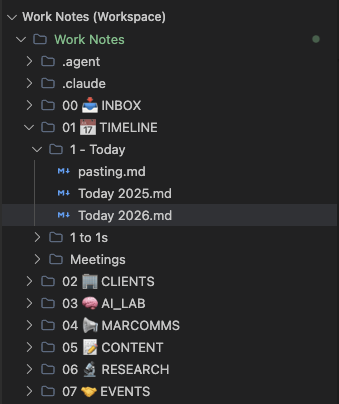
Beyond that, I can’t tell you exactly how to organise things. It has to be built around how your brain works, not mine. The only non-negotiable is that you can find what you’re looking for quickly. Hence the emojis… and sorry I am not expanding those folders cant go around showing everything!
The Payoff
Since switching to this system, my files are accessible to the tools I use at work without me having to do anything special. My personal notes are easy to navigate. And when I drop a folder of notes into Gemini or Claude, it just works. No converting, no copying and pasting, no reformatting.
It’s made things a little bit easier in the day-to-day, and it’s setting me up well for however AI tools develop from here.
Start small. Pick one type of notes you currently keep somewhere and move them to plain text files. Organise them in a way that makes sense to you. That’s it. You’re already more AI-ready than you were yesterday.
 Fizzy Logic: My Messy AI Journey
Leave a comment